DeployLab
Your preinstall tools, ready when you need them.
A Win32 app that simplifies downloading software installation and tools onto any Windows computer. Replacing the need for a USB on your key chain or an unreliable Windows share/samba server. Using simple FTP implementation requring only an FTP server. The goal is one click access to all of your software with no need to login.
| Link | Type | Platform | Status |
|---|---|---|---|
| Download | .exe | Windows | Available |
Portable app with no dependencies
Screenshot
Browse your shared tool library, follow transfer progress, and open completed downloads from one window.
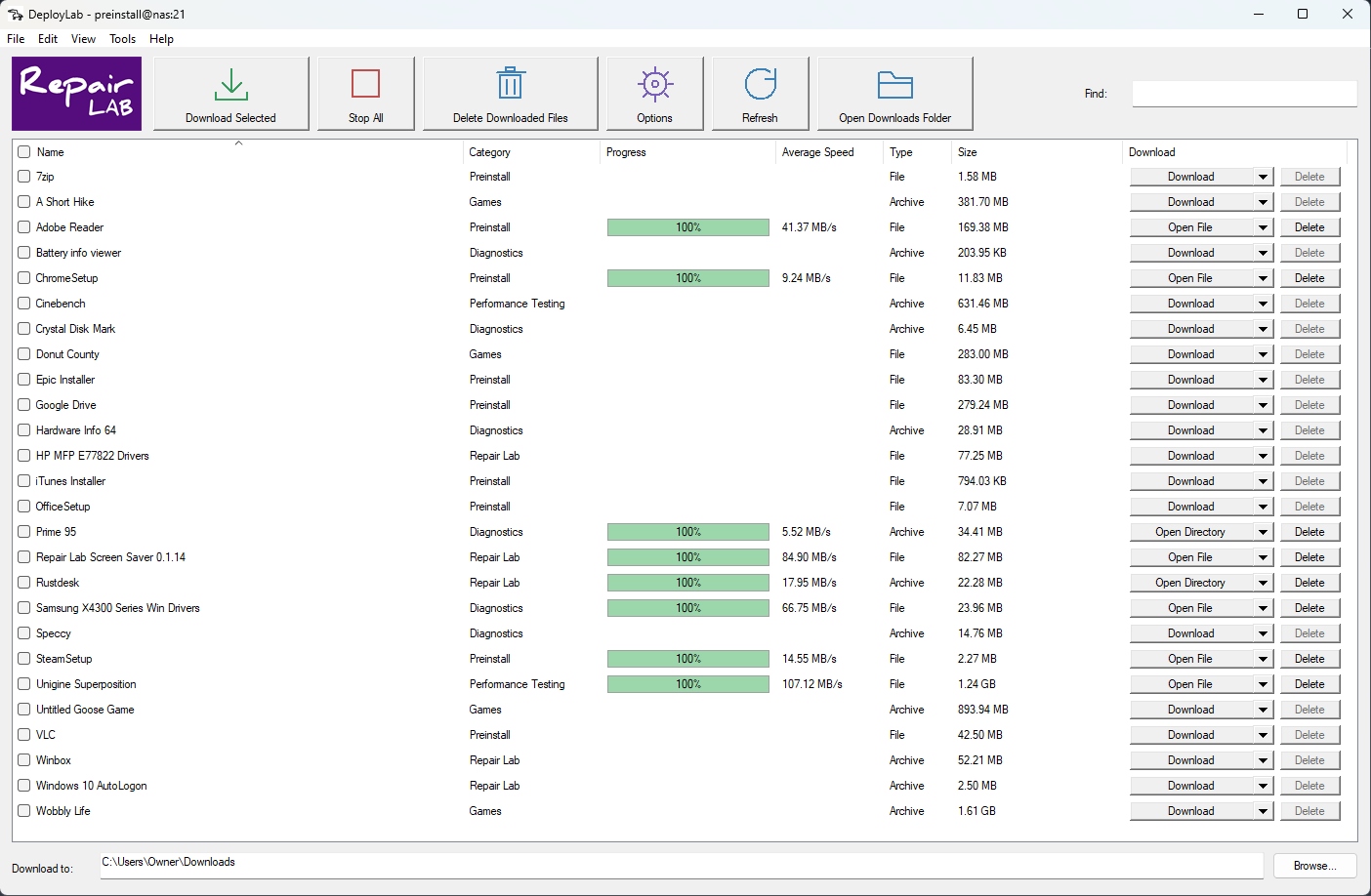
The main features of DeployLab
- Portable and ready to run - A single executable with no installer, .NET or Visual C++ redistributable required.
- Centralised tool library - Access files and folders from your configured FTP server in one convenient place.
- Multi-connection downloads - Uses up to four connections per file, with two download jobs running at once and additional items queued automatically.
- Download complete folders - Retrieve entire folder structures, including nested and empty folders.
- Built-in compression and extraction - Upload folders as compressed archives and automatically extract them when downloaded. No external archiver needed.
- Drag-and-drop uploads - Add files and folders directly from Windows Explorer.
- Clear transfer progress - View download, upload, compression and extraction progress, with transfer speeds and detailed download statistics.
- Download and open - Open completed files or folders directly, or choose to open them automatically after downloading.
- Organise your collection - Edit item names and categories, rename files, and remove outdated server content.
- Choose where files go - Select your download destination to suit each job.
- Convenient cleanup - Remove individual downloaded items or clear files downloaded during the current session.
- Responsive background transfers - Continue using the library while downloads run, with individual cancellation and a Stop All control.
Your shared toolkit within reach
Portable app for accessing and organising your team's preinstall tools. Read the getting started guide or browse the FAQ.
Download DeployLab
Portable Win32 app
DeployLab runs on Windows as a single portable executable. There is no installer, and no .NET or Visual C++ redistributable is required.
| Link | Type | Platform | Status |
|---|---|---|---|
| Download | .exe | Windows | Available |
Download DeployLab.exe and run it to get started.
Before you start
You will need access to your configured FTP server to use the shared tool library. Choose a download destination that suits the job, then download individual files or complete folders.
Version number, file size, Windows version requirements, and release date will be added separately.
Getting started
Access your shared preinstall toolkit from one portable Windows application.
Open your library
- Download the DeployLab executable.
- Run the application. No installer or additional .NET or Visual C++ runtime is required.
- Use your configured FTP server to access your team's files and folders.
- Select a download destination for the current job.
Download files and folders
Download individual files or entire folder structures, including nested and empty folders. DeployLab runs two download jobs at once, uses up to four connections per file, and queues additional items automatically.
Monitor transfer speeds and detailed download statistics while you continue browsing the library. Cancel an individual transfer or use Stop All. Open completed files or folders directly, or choose to open them automatically after download.
Upload and organise tools
Drag files and folders from Windows Explorer into DeployLab. Folders can be uploaded as compressed archives and extracted automatically when downloaded, without an external archiver.
Edit item names and categories, rename files, and remove outdated server content to keep the shared collection organised.
Clean up after a job
Remove individual downloaded items or clear files downloaded during the current session.
Detailed server configuration instructions will be added separately.
Frequently asked questions
Does DeployLab need to be installed?
No. DeployLab is a single portable Windows executable. No installer, .NET or Visual C++ redistributable is required.
Where are the tools stored?
DeployLab accesses a shared library of files and folders on your configured FTP server.
Can I download a complete folder?
Yes. Complete folder structures are supported, including nested and empty folders.
How many downloads can run at once?
Two download jobs run at once, with up to four connections per file. Additional items are queued automatically.
Do I need a separate compression tool?
No. Compression and extraction are built in. Upload folders as compressed archives and automatically extract them when downloaded.
Can I upload files from Windows Explorer?
Yes. Drag and drop files and folders directly from Windows Explorer.
Can I keep browsing while transfers run?
Yes. Transfers run in the background. You can cancel individual transfers or use Stop All.
Where can I download DeployLab?
Download DeployLab.exe or visit the download page for details.
Support
A support contact or issue tracker has not been linked yet.
Reporting an issue
When a support channel is available, include:
- The DeployLab version you are using.
- Your operating system and version.
- The steps needed to reproduce the issue.
- What you expected and what happened instead.
- Relevant error messages, with passwords and other private information removed.
Check the FAQ and documentation for available guidance.
Version history
Download the current DeployLab executable. A detailed release history has not been added yet.
Future entries will list version numbers, release dates, and changes, with links to their downloads.
About DeployLab
Your preinstall tools, ready when you need them.
DeployLab gives repair technicians and IT teams a simple way to access a shared library of installers, drivers, utilities and setup files. Download individual files or complete folders, upload new tools, and keep your collection organised-all from one portable Windows application.
Built for repair technicians and IT teams
Keep installers, drivers, utilities and setup files in a centralised FTP library. DeployLab brings downloads, uploads, compression, extraction and collection management together in a single portable Windows executable.
License
License terms for DeployLab have not been published on this website yet.
Refer to the license supplied with the application before using or distributing it.